- Your cart is empty
- Continue Shopping



Urbanite – Architect & Real Estate Developer Elementor Template Kit

Urbanite – Architect & Real Estate Developer Elementor Template Kit
₹199.00
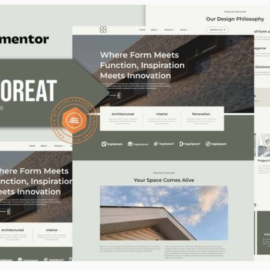
Urbanite is a modern and clean Elementor Template Kit designed specifically for architects, real estate developers, home development agencies, construction firms, interior designers, and property-related businesses. This kit has a beautiful and unique design with a 100% responsive layout, retina- ready, and very easy to customize because using Elementor so you don’t need a single line of coding!
Add to cart
Buy Now
Urbanite is a modern and clean Elementor Template Kit designed specifically for architects, real estate developers, home development agencies, construction firms, interior designers, and property-related businesses. This kit has a beautiful and unique design with a 100% responsive layout, retina- ready, and very easy to customize because using Elementor so you don’t need a single line of coding!
With its beautiful and unique design, Urbanite ensures that your website stands out from the competition. The templates are fully responsive, adapting seamlessly to any device, and retina-ready, providing stunning visuals. Best of all, customization is a breeze with Elementor. You can effortlessly personalize your website without writing a single line of code.
Choose from our carefully crafted selection of 14 stunning templates to create a website that perfectly represents your brand and services. Showcase your architectural designs, highlight your real estate projects, and engage your audience with captivating visuals and smooth user experience. With Urbanite, creating a professional-looking website has never been easier!
Features:
- Using Free Plugins (Elementor Pro is not required)
- Modern & Clean Design
- 14 Ready to use templates
- Fully Responsive Layout
- Retina Ready
- Fully Customizable
- Cross Browser Compatibility: Chrome, Firefox, Safari, Opera
Templates Include:
- Home
- About
- Services
- Pricing
- FAQ
- 404 Page
- Blog
- Single Post
- Contact
- JKit – Off Canvas
- MetForm – Contact
- Header
- Footer
- Global Theme Style
Required Plugin:
- Elementor
- Jeg Elementor Kit
- MetForm
How to Use Template Kits:
- Install and Activate the “Envato Elements” plugin from Plugins > Add New in WordPress. You do NOT need an Envato Elements subscription to use this plugin to install kits.
- Download your kit file and Do not unzip it! If you have Safari, ensure “open safe files after downloading” is not enabled in preferences.
- Go to Elements > Installed Kits and click the Upload Template Kit button. You may also import automatically by clicking Connect Account to link your Elements subscription, then import under Elements > Template Kits.
- Check for the orange banner at the top and click Install Requirements to load any plugins the kit uses
- Click import on the Global Kit Styles first
- Click Import on one template at a time. These are stored in Elementor under Templates > Saved Templates.
- Go to Pages and create a new page and click Edit with Elementor
- Click the gear icon at lower-left of the builder to view page settings and choose Elementor Full Width and hide page title
- Click the gray folder icon to access My Templates tab and then Import the page you’d like to customize.
Related products