- Your cart is empty
- Continue Shopping







Estella – Dance School & Studio Elementor Template Kit
Estella – Dance School & Studio Elementor Template Kit
₹199.00
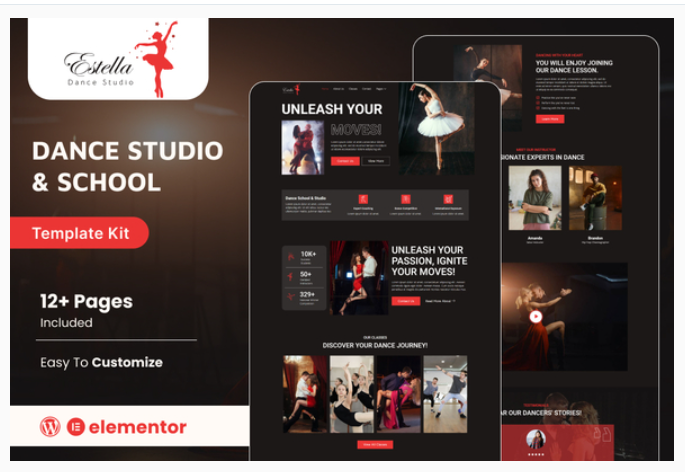
Estella is an Elementor Template Kit tailored for dance studios seeking to enchant their online presence. With sleek design elements and fluid layouts, Estella effortlessly merges elegance with functionality. From showcasing dynamic class schedules to highlighting mesmerizing performances, this kit offers a seamless platform to captivate your audience. Dive into a world where every movement is celebrated, every beat resonates, and every click leads to an immersive dance experience. Elevate your studio’s online persona with Estella, where rhythm meets innovation.
Add to cart
Buy Now
Feature
- Individual elements can be fine-tuned or fonts and colors can be changed all in one spot.
- Drag-and-drop visual builder for true no-code customization.
- Design that is both contemporary and professional.
- Fast-loading.
- Most Elementor themes are compatible with this templatekit.
Templates Include:
- Home
- About us
- Classes
- Contact
- Blogs
- Our Studio
- Blog details
- Faq
- Pricing
- Coming Soon
- 404
Sections and Blocks:
- Header
- Footer
- Contact Form
- Newsletter Form
- Get in Touch
Required Plugins Pre-Installed With the Kit
- Elementor
- Jeg Elementor Kit
- Metform
- Go to Settings > Permalinks and ensure Post Name is selected
- Go to Appearance > Themes > Add New and ensure Hello Elementor is installed and activated. This will prompt you to install Elementor if you haven’t already.
- Go to Plugins and ensure Elementor and Envato Elements are installed and at the latest version. If your kit requires Elementor Pro, it must be installed now and connected to your account.
- Go to Elements > Installed Kits and click Upload Template Kit Zip (or click your kit to view it)
- Check for the orange banner at the top and click Install Requirements to load any plugins the kit uses. https://envato.d.pr/ughD8Q
- Click import on the Global Kit Styles first. This will setup the site settings.
- Click Import on one template at a time in the order shown. These are stored in Elementor under Templates > Saved Templates and are re-used from here.